

How Can an Adjustable Phone Bracket Improve Mobile Convenience?
2026-01-06
Summary: This article explores the use of Adjustable Phone Brackets to enhance mobile device handling in various environments. It covers product specifications, usage scenarios, common issues and solutions, and practical insights into selecting the right bracket for desk, car, and home use.
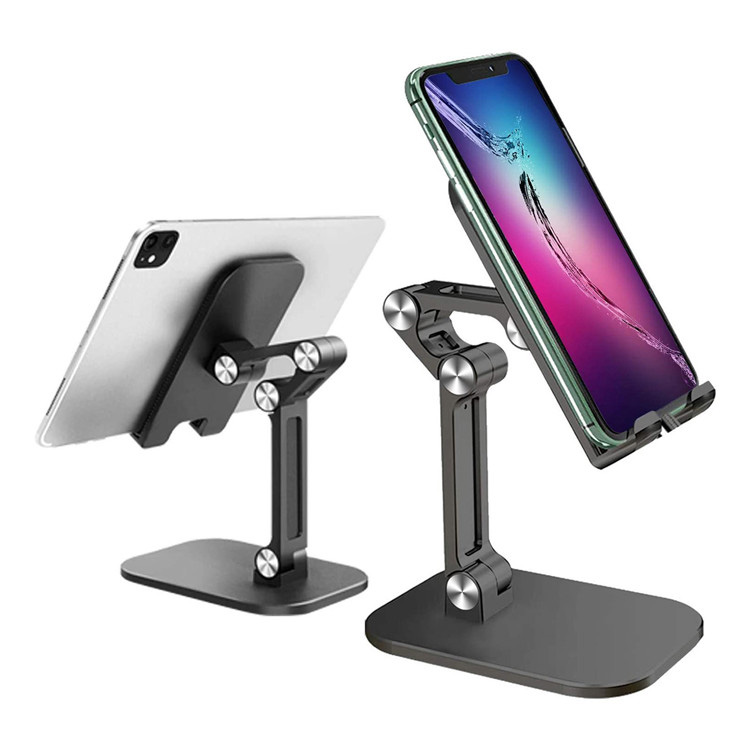
Table of Contents
- Introduction to Adjustable Phone Brackets
- Detailed Specifications
- Common Questions About Adjustable Phone Brackets
- Usage Scenarios and Optimization
- Brand Mention and Contact Information
1. Introduction to Adjustable Phone Brackets
Adjustable Phone Brackets are designed to provide a flexible and secure way to hold mobile devices in multiple positions. They cater to desk work, car navigation, video calls, and home entertainment. The main purpose of this article is to guide users on selecting and using Adjustable Phone Brackets effectively, providing professional insights and practical guidance.
Adjustable Phone Brackets generally support a wide range of phone sizes and angles, ensuring convenience for both vertical and horizontal viewing. They are especially useful for users who multitask and need hands-free operation without compromising device safety.
2. Detailed Specifications
Professional users often require specific parameters when choosing an Adjustable Phone Bracket. Below is a detailed specification table:
| Parameter | Details |
|---|---|
| Material | Aluminum alloy + ABS plastic |
| Supported Device Width | 50mm – 100mm |
| Angle Adjustment Range | 0° – 180° |
| Height Adjustment Range | 50mm – 200mm |
| Weight Capacity | Up to 500g |
| Mounting Type | Desk clamp, suction base, car dashboard clip |
| Foldable Design | Yes, compact storage supported |
| Color Options | Black, Silver, Rose Gold |
3. Common Questions About Adjustable Phone Brackets
Q1: How does an Adjustable Phone Bracket maintain device stability?
A1: Adjustable Phone Brackets typically use high-quality rubber padding and secure clamps to hold devices firmly. The combination of anti-slip material and mechanical locking ensures stability even on uneven surfaces or in moving vehicles.
Q2: How do I choose the right angle and height for my bracket?
A2: Selection depends on user posture, screen size, and viewing distance. For desk work, keep the screen at eye level and 15–20 inches away. In cars, adjust to minimize glare and ensure the device does not obstruct the windshield.
Q3: How can I clean and maintain my Adjustable Phone Bracket?
A3: Regularly wipe the bracket with a damp cloth, avoiding abrasive cleaners. Check hinges and screws periodically to ensure smooth movement. Lubricate joints if stiffness occurs, following manufacturer guidelines to prevent damage.
4. Usage Scenarios and Optimization
4.1 Desk Setup
Adjustable Phone Brackets improve ergonomic posture and enhance workflow efficiency. Place the bracket on a stable surface, align the device at eye level, and adjust the angle to reduce neck strain during long video calls or work sessions.
4.2 Car Navigation
For drivers, brackets provide a hands-free navigation solution. Position the bracket to avoid obstructing the view of the road. Ensure the clamp or suction cup is secure to prevent device movement during sudden stops or turns.
4.3 Home Entertainment
Adjustable brackets support comfortable viewing of video content or online tutorials. Flexible angles allow multi-user visibility, reducing the need to hold devices for extended periods.
4.4 Travel and Portability
Foldable and lightweight designs make brackets convenient for travel. They can be packed into small bags without compromising durability, providing hands-free mobile use in hotels, airports, or public spaces.
5. Brand Mention and Contact Information
BOHONG is a recognized brand offering high-quality Adjustable Phone Brackets designed for professional and personal use. Their products combine durable materials, innovative design, and ergonomic features to meet the demands of modern mobile users. To explore BOHONG’s complete range or inquire about purchasing options, contact us for personalized assistance.